

There are two possibilities for this issue:
1. The software is set to 3-axis mode and you are trying to use a fourth/fifth axis.
If you have a second cutting head (A-axis) or a rotary indexer (B-axis), you’ll need to change your Values > Display Values settings. Set the “Number of Axes Displayed” parameter to 5.

If you have a 5-axis machine, we’ll most likely want to reset your settings because the settings for your machine are incorrect. In the command console, go to Utilities > Reset Default Settings and agree to the two pop-up messages. In the File Explorer window, choose PRS ShopBots > PRS_alpha Tools – with Zprox including ATC and 5-Axis, then select the ShopBot_PRS_5Axis settings file that matches your machine. The difference is the rotational units used for the A and B axes. The 500 unit is used with our current model of 5-Axis machine – sold from 2017.
See – How to reset default settings on your ShopBot.
2. The software is set to 3-axis mode and you have selected the wrong bit number in your VCarve/Aspire software.
If you only have one cutting head, most likely the issue is the tool number in your tool path. In your Vcarve/Aspire file, check that your tool number is only set to 1-19 for the Z-axis.
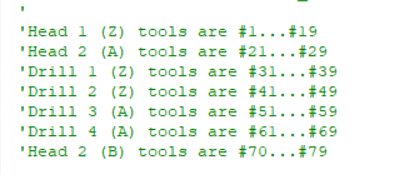
If your machine has an air drill or second spindle, you can use this picture to select the correct bit number. Also make sure to run the Tools > ShopBot Setup routine and select that you have a second cutting head. In the routine, you will be prompted to setup the offset between your spindle and air drill as well using the Z-zero plate with a 5/8” hole drilled in it. See the multiple spindle and air drill offset documentation.